
Table of Contents
Last checked: 23 September 2026
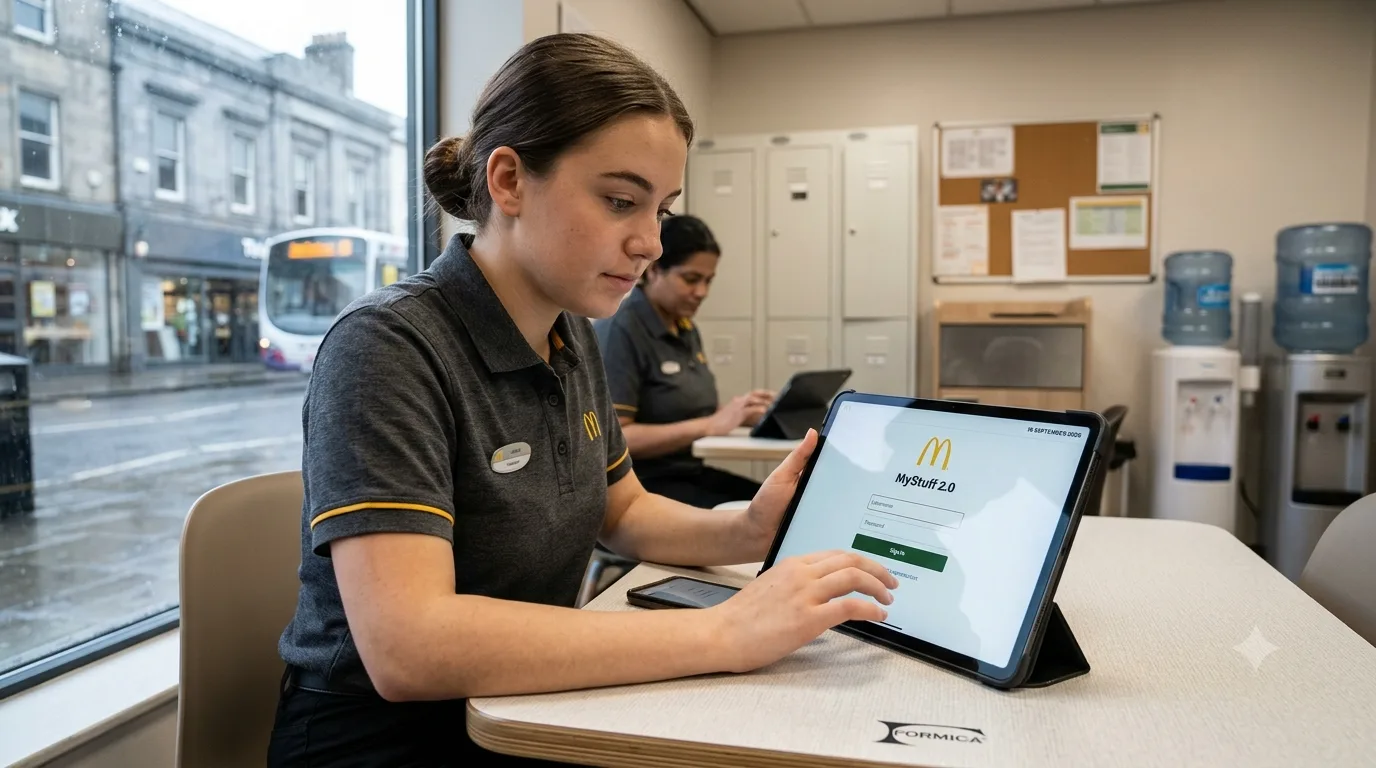
MyStuff 2.0 is McDonald’s employee HR system used in the UK for tasks including viewing payslips, updating personal information, requesting holidays, completing performance reviews and recording goals.
Employees looking for the MyStuff 2.0 login should use the official McDonald’s MyStuff portal and the login method assigned to their account.
The current login screen provides McDonald’s account access as well as native account access and includes username, password and two-factor authentication fields.
Importantly, MyStuff 2.0 should not be confused with every other McDonald’s staff platform. McDonald’s identifies CAMPUS as its learning-management system, while other services may be used for recruitment, scheduling, reference material or talent management.
This updated guide explains how MyStuff 2.0 works, which login route different users may need, how password recovery works, what to do when the dashboard does not load and how MyStuff differs from Harri and McD CAMPUS.
What Is MyStuff 2.0 at McDonald’s?
MyStuff 2.0 is McDonald’s HR and employee self-service system.
McDonald’s describes it as a mobile-friendly employee system that allows staff to manage their own information, holidays and time off and view wage slips.
Its current employee handbook also lists performance reviews, goals and personal-detail changes among the tasks handled through MyStuff 2.0.
Depending on an employee’s position and account permissions, MyStuff and the wider McDonald’s single-sign-on environment can provide access to or connect employees with other work-related tools.
The main purposes associated with MyStuff include:
| MyStuff 2.0 function | What employees may use it for |
| Payslips | Viewing employment pay information and payslips |
| Personal details | Updating addresses, emergency contacts and other information |
| Holidays | Requesting and managing time off |
| Performance | Completing performance reviews |
| Goals | Recording work and development goals |
| Employee records | Checking HR-related information |
| Single sign-on | Connecting authorised users with other McDonald’s systems |
McDonald’s has specifically advised employees to keep personal details such as addresses, emergency contacts and bank information up to date through MyStuff where applicable.
How Do Employees Log In to MyStuff 2.0?
The login route can differ according to the employee’s account and role, so employees should not assume that another colleague’s sign-in method will necessarily be identical.
As of 16 September 2026, the official MyStuff 2.0 page displays:
- Log in with McDonald’s Account
- Log in with native account
- Username and password fields
- A six-digit two-factor authentication field
- An I forgot my password option
- A Choose different login option control
- Company Code 1341
The live portal identified itself as My Stuff 2.0 and displayed version 2026.9.0 when checked.
A normal login process is therefore:
- Open the official McDonald’s MyStuff 2.0 portal.
- Choose the McDonald’s account or other login option assigned to the employee.
- Enter the authorised username or employee credentials.
- Enter the account password.
- Complete two-factor authentication if the account requests it.
- Continue to the employee dashboard.
Employees should use bookmarks supplied by McDonald’s or their manager rather than login links copied from unofficial websites, emails or search adverts.
Which MyStuff 2.0 Login Should Different Employees Use?
MyStuff access is not necessarily identical for every person in McDonald’s organisation.
The main user groups include crew members and trainers, restaurant management and franchise staff, corporate users, consultants and suppliers, and former employees or associates.
Crew Members and Crew Trainers
Crew members and trainers should normally begin with the McDonald’s account option presented through the authorised portal.
The employee should use the credentials provided or activated during employment rather than creating an unrelated personal account.
If credentials have never worked, particularly for a new starter, the problem may be account activation or onboarding rather than an incorrect password.
Restaurant Managers and Franchisees
Restaurant managers, franchise employees and office staff may be routed through a different authentication path based on the organisation or franchise account connected to their McDonald’s credentials.
If an employee sees a login screen different from the one another restaurant uses, that does not automatically mean the page is incorrect.
The safest approach is to enter MyStuff through the official McDonald’s route and follow the account options assigned to that user.
Corporate Employees
McDonald’s corporate employees may use corporate single sign-on credentials rather than the same login workflow used by restaurant crew.
Corporate accounts can also have different permissions because employees may require access to additional internal systems.
Consultants and Suppliers
Authorised consultants, suppliers and other partners should use the access method issued specifically for their relationship with McDonald’s.
They should not attempt to use restaurant-crew credentials or another employee’s account.
Ex-employees and Former Associates
Former employees are an important exception because the login and recovery options available to active employees may no longer apply after employment has ended.
If a former employee still has an authorised account and knows the username, the account-recovery process may allow a password to be reset.
However, if the former employee no longer knows the username, online password recovery alone may not solve the problem. In that situation, the former restaurant manager, People team or relevant HR support route may need to confirm what access remains available.
How Can a Forgotten MyStuff 2.0 Password Be Reset?
The current official MyStuff page includes an I forgot my password option.
An employee having difficulty signing in should:
- Open the official MyStuff 2.0 login screen.
- Select I forgot my password.
- Enter the username, McDonald’s ID or other information requested by the recovery page.
- Complete any identity-verification step presented.
- Check the registered email account if recovery instructions are sent by email.
- Follow the reset instructions and create a new password.
- Return to MyStuff and sign in again.
Employees should also check their junk or spam folder if a genuine reset message is expected but has not appeared.
Repeatedly guessing passwords is not recommended because it can make account-recovery problems more difficult and may trigger additional security controls.
What Should an Employee Do After Forgetting a MyStuff Username?
A password reset is only useful if the employee still knows the username or employee identifier attached to the account.
Current employees who cannot identify their account should speak with their restaurant manager, People Manager or authorised support team.
Former employees can face a particular problem because their normal employee access may have changed after leaving McDonald’s.
If no online username-recovery option is available, the former manager or appropriate People Services contact is the more suitable route.
Employees should not create a second account simply because they have forgotten the original username.
Why Is MyStuff 2.0 Not Working?
Login failures do not always mean that the employee has entered the wrong password.
Several browser, network, authentication and account-provisioning issues can prevent MyStuff from loading correctly.
| Problem | What to try |
| Page keeps refreshing or redirects repeatedly | Clear cookies and cached site data, close the browser and try again |
| Login works in one browser but not another | Try a current version of Chrome, Edge or Firefox |
| Portal will not load on Wi-Fi | Test using mobile data or another trusted network |
| Old bookmark stops working | Return to the official McDonald’s access route rather than relying on an old saved page |
| Blank page after signing in | Sign out fully, reopen the browser and sign in again |
| 2FA code fails | Make sure the newest code is being entered and that the device/account is the correct one |
| Password reset email does not arrive | Check spam, confirm the correct account was used and contact support if necessary |
| Dashboard has no tiles or services | Check whether onboarding and account permissions have been completed |
| New starter cannot access anything | Ask a manager whether the employee account has been provisioned fully |
| Account still fails on several devices | Contact the manager or McDonald’s People Services rather than repeatedly attempting logins |
Clearing Cookies and Cached Data
Old authentication cookies can cause redirect loops or prevent a newly changed password from being recognised correctly.
Clearing browser data for the portal and then reopening it can resolve these session problems.
Using a private or incognito window can also help determine whether stored browser data is responsible.
Switching Browsers
If MyStuff works badly in one browser, testing another current browser can identify a compatibility or extension problem.
Employees should also disable aggressive content blockers temporarily if those extensions interfere with the login process.
Trying a Different Internet Connection
If the page works through mobile data but not through a particular Wi-Fi connection, the network may be blocking or interfering with part of the authentication process.
Public Wi-Fi should be avoided when viewing sensitive employment information such as payslips wherever possible.
Fixing the “No Tiles” or Empty Dashboard Problem
An employee may occasionally be able to authenticate successfully but see an empty dashboard or find that expected services are missing.
First:
- Sign out completely.
- Clear the browser session.
- Sign back in.
- Try another browser or device.
If the dashboard remains empty, particularly for a new employee, it can indicate that onboarding, role assignment or account provisioning has not been completed.
A manager or People team member may therefore need to check the employee’s access rather than the employee repeatedly resetting the password.
Is MyStuff 2.0 the Same as Harri?
No. Employees should not automatically treat MyStuff and Harri as interchangeable systems.
MyStuff 2.0 is McDonald’s HR employee system. McDonald’s confirms that it is used for HR-related tasks such as payslips, holidays, personal details, goals and performance reviews.
Harri is a separate workforce and recruitment technology platform that may appear during recruitment or onboarding in some employment or franchise processes.
The important distinction is that receiving a Harri invitation does not mean an employee should use the same username, password or URL for MyStuff.
If an employee receives onboarding instructions referring specifically to Harri, those instructions should be completed through the platform named in the genuine recruitment communication.
Once employment begins, MyStuff can have a separate role as the employee’s McDonald’s HR system.
Is MyStuff 2.0 the Same as McD CAMPUS?
No.
McDonald’s current employee handbook separates the two systems clearly:
- MyStuff 2.0 – HR system
- CAMPUS – learning-management system
CAMPUS is used when employees need to book an internal course or run a webinar, while MyStuff deals with HR information such as payslips, holidays, personal details, goals and reviews.
McDonald’s also references other employee systems, including:
- Headlight for talent management and career aspirations
- FRED for learning reference material
This distinction matters because an employee searching for training may not find the relevant content directly inside the same section used to view a payslip.
What About Hamburger University?
Hamburger University is associated with McDonald’s wider training and leadership-development structure, but employees should not use “Hamburger University”, CAMPUS and MyStuff as interchangeable names.
For day-to-day login purposes, employees should follow the specific platform named in their McDonald’s training or HR instructions.
What Did MyStuff 2.0 Replace?
Before MyStuff 2.0, McDonald’s referred to an employee portal called People Stuff.
An older McDonald’s help page described People Stuff as a portal where employees could book holidays, update addresses and personal details, book training courses and access payslips.
McDonald’s subsequently described MyStuff 2.0 as its “new and improved people system” and reported that it launched in November 2019.
In its 2019 corporate-governance material, McDonald’s reported:
- 2.7 million logins after launch
- 118,000 employee users
- 24,700 new starters onboarded
The system was designed as a mobile-friendly platform with single sign-on access to a wider range of McDonald’s tools.
It is therefore reasonable to regard MyStuff 2.0 as the successor to the earlier People Stuff-era employee system rather than an unrelated consumer application.
How Should Employees Protect Their MyStuff 2.0 Account?
MyStuff contains sensitive employment information, potentially including personal details, bank information and payslips.
Security should therefore be treated differently from an ordinary entertainment or social-media account.
The current MyStuff login page warns that only people with an authorised username and password may use the system. It also currently provides support for two-factor authentication.
Employees should:
- Use only the official McDonald’s login route.
- Never share their password with colleagues.
- Never send a 2FA security code to another person.
- Avoid logging in through links in unexpected emails or text messages.
- Check the website address before entering credentials.
- Use a unique password that is not shared with personal accounts.
- Sign out after viewing payslips on a shared device.
- Avoid saving employment passwords on public or shared computers.
- Report suspected unauthorised disclosure or account compromise promptly.
McDonald’s employee guidance also tells staff that personal information must be kept confidential and states that employees should inform their manager if they become aware of a loss or unauthorised disclosure of data.
An unexpected message asking an employee to “verify” a payslip account by sending a password, authentication code or bank details should therefore be treated cautiously.
Who Can Help With MyStuff 2.0 Problems?
The appropriate support route depends on the problem.
For account setup, missing access or login problems, the employee’s restaurant manager or People Manager is often the most useful first contact because they can determine whether the individual’s employment account has been activated correctly.
McDonald’s employee guidance also lists its People Services Helpdesk for matters including access to MyStuff 2.0 and CAMPUS. The same guidance separates general People Services enquiries from payroll-specific enquiries.
Employees with a missing dashboard, incorrect role or inaccessible account should explain the exact error rather than simply requesting a password reset.
A screenshot of an error message can help support staff determine whether the issue concerns authentication, permissions or system access.
Is MyStuff 2.0 Available on Mobile?
McDonald’s describes MyStuff 2.0 as a mobile-friendly platform.
Employees can therefore use an appropriate mobile browser where their account and security requirements permit it.
Users should be cautious about downloading apps that simply use the MyStuff or McDonald’s name. An app-store listing alone does not establish that an application is an authorised McDonald’s employee tool.
Using the access route supplied directly by McDonald’s, an employee’s manager or the official employee portal is safer than relying on an unofficial app or third-party login website.
What Should Employees Remember About MyStuff 2.0?
MyStuff 2.0 is a McDonald’s HR system, not a personal inventory application.
Its main role is to give authorised McDonald’s employees access to important HR functions such as payslips, holidays, personal details, performance reviews and goals.
The most important points are:
- Login methods can vary according to account and role.
- Crew, management, franchise, corporate and partner accounts may not follow identical authentication routes.
- Former employees can have different recovery requirements.
- Password recovery does not necessarily recover a forgotten username.
- Browser caches and old login sessions can cause authentication problems.
- An empty dashboard may indicate incomplete account provisioning rather than a bad password.
- MyStuff and Harri are separate systems.
- MyStuff and CAMPUS have different purposes.
- MyStuff 2.0 followed McDonald’s earlier People Stuff system.
- Payslip and employee information should be treated as sensitive personal data.
Using the correct platform and support route can prevent employees from repeatedly resetting credentials when the real problem is role assignment, onboarding or access permissions.
FAQs About MyStuff 2.0
What is MyStuff 2.0?
MyStuff 2.0 is McDonald’s HR employee system. It is used for functions including payslips, holidays, personal information, goals and performance reviews.
How can McDonald’s employees access MyStuff 2.0?
Employees should enter through the official McDonald’s MyStuff portal and use the McDonald’s account or other authorised login option assigned to them.
What should an employee do if a MyStuff 2.0 password is forgotten?
Use the I forgot my password option on the official login screen and follow the identity-verification and recovery instructions shown.
Can former McDonald’s employees access MyStuff 2.0?
Former employees may have a different login or recovery process from active staff. If access or the username is unavailable, the former manager or relevant People/HR support team may need to help.
Why does MyStuff 2.0 show no tiles after login?
An empty dashboard can result from a browser session problem, but for new employees it may also indicate incomplete onboarding, permissions or account provisioning. Signing out and testing another browser should be tried before contacting a manager.
Is MyStuff 2.0 the same as Harri?
No. MyStuff is McDonald’s HR employee system. Harri is a separate workforce/recruitment platform that may appear in some recruitment or onboarding processes.
Is McD CAMPUS the same as MyStuff 2.0?
No. McDonald’s identifies CAMPUS as its learning-management system, while MyStuff 2.0 is its HR system.
Can employees view payslips through MyStuff 2.0?
Yes. McDonald’s official employee material specifically identifies viewing payslips as one of MyStuff 2.0’s functions.
Can MyStuff 2.0 be used on a phone?
McDonald’s describes the platform as mobile-friendly. Employees should use the authorised McDonald’s access route rather than assuming an unofficial app-store application is genuine.
Did MyStuff 2.0 replace People Stuff?
McDonald’s previously operated a People Stuff employee portal and described MyStuff 2.0 as its new and improved people system when it launched in November 2019. MyStuff 2.0 can therefore be understood as the successor to that earlier employee-system generation.